


From Copilot to Agents: SAP Joule in S/4HANA (Public + Private Edition 2025) and BTP/Build

If your S/4HANA Cloud Private Edition is 2025, this is what matters most about SAP Joule for Public + Private—and how it also impacts your BTP/Build approach.
In 2026, the conversation stopped being “What is Joule?” and became operational: where do you enable it, what do you activate first, and how do you prove value quickly without compromising security or compliance? In a landscape with S/4HANA Cloud Public + S/4HANA Cloud Private Edition 2025 + BTP/Build, the following route tends to work:
Solid foundation: integration + roles + user experience (Fiori and, if applicable, Work Zone/Start/Mobile Start).
Safe quick win: Finance in read-only mode (low risk, immediate value).
Scale with agents: build a minimal agent in Joule Studio with golden prompts and guardrails.
1) What’s new in SAP Joule (what changes implementation)
Beyond “chat”, Joule today is backed by capabilities that enable an adoption and scaling strategy:
Joule Studio and Agent Builder: create custom agents with tools and orchestration across systems.
Unified experience: integration with SAP Build Work Zone as a user “front door”.
PCE 2025: Joule for Developers (ABAP AI) as an accelerator for extensions and tailor-made read-only services.
Governance focus: guardrails, negative tests (no role = no data), and adoption measurement.
2) Public vs Private Edition (PCE 2025): differences that matter
Public Edition typically moves with a steady release cadence and prebuilt scenarios. Private Edition (PCE 2025) depends more on enablement (technical integration + roles/authorizations + governance), but once it is properly integrated into Fiori Launchpad, day-to-day usage improves significantly.
3) Recommended architecture (Public + Private + BTP/Build)
To make the Finance use case scale, it helps to think of Joule as: experience + agent + tools + read sources.

Figure 1 - Reference architecture (Joule + S/4 Public/Private + BTP/Build)
4) Recommended quick win: Finance Fast Answers (read-only)
To prove value quickly with minimal risk, a Finance read-only quick win is often the most effective:
“What is blocked and why?”
“What is overdue / what is about to become overdue?”
“What is the status of this document?”
“I need an executive summary for the CFO.”
The key is: fewer clicks + consistent structure + permission control + traceability of the data source.
5) Agent execution: Joule in FLP vs a dedicated Fiori app
There are two useful patterns (and they can be combined):
Pattern A — Joule embedded in Fiori Launchpad (fast adoption)
In PCE, the common path is to enable the communication scenario and the FLP plugin so users can open Joule directly inside the Launchpad.
Pattern B — Finance agent executed from a Fiori application (more control)
You build a Fiori “Finance Assistant” app with a chat area, prompt buttons, tables/KPIs and auditing. The app calls a tool gateway in BTP, the agent decides which tool to run, and then returns a structured answer.
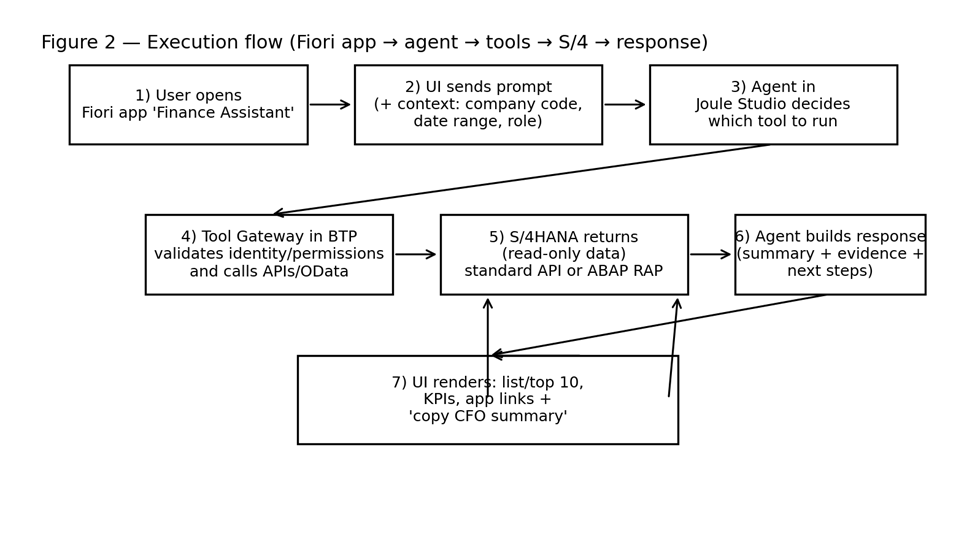
Figure 2 - Execution flow (Fiori app -> agent -> tools -> S/4 -> response)
6) Read sources (read-only): standard APIs, ABAP/RAP and analytics
For a Finance read-only agent, these are the most practical options:
Option 1 — Standard APIs (OData/SOAP) via SAP Business Accelerator Hub
Use the Hub as the API catalog and validate coverage for your objects and filters. Start with read operations even if the API also exposes write capabilities.
Option 2 — Custom ABAP services (RAP/OData V4) when standard isn’t enough
If your golden prompts require joins, rules or specific fields, expose a read-only RAP/OData service in ABAP. This gives you precise contracts, fine-grained authorization and optimized performance.
Option 3 — Analytics layer for aggregated KPIs
Useful when the goal is to compare periods, trends and drivers, avoiding transactional-level detail.

Figure 3 - Source decision (standard API vs ABAP RAP vs analytics)
7) Practical example: build a Finance MVP agent and run it from Fiori
Goal: a read-only agent that answers AP/AR/close questions and always returns:
Summary (1–3 lines)
Evidence (filters + findings)
Next steps (what to review and where)
Constraints (missing role/data or out-of-scope request)
Agent tools (recommended model)
Instead of wiring “everything” directly into the LLM, define tools with stable contracts, for example:
· ListBlockedSupplierInvoices(companyCode, fromDate, toDate, topN)
· GetSupplierInvoiceStatus(documentId)
· ListOverdueReceivables(companyCode, daysOverdue, topN)
· GetPeriodCloseTasks(companyCode, period)
Example of a tool contract (simplified)
 {
  "toolName": "ListBlockedSupplierInvoices",
  "inputs": ["companyCode", "fromDate", "toDate", "topN"],
  "output": {
    "totalCount": "number",
    "totalAmount": "number",
    "items": [
      {"supplier": "string", "documentId": "string", "postingDate": "date", "amount": "number", "blockReason": "string"}
    ]
  }
}
How this looks in a Fiori app (practical UI)
A simple layout can include four buttons (golden prompts): AP blocked, AR overdue +30, CFO summary, and “Explain blocks”. When the user clicks a button, the app sends the prompt plus context (company code, date range), and renders: top 10 table, totals, reasons, navigation links, and a “copy CFO summary” action.
8) Golden prompts (10) with example tool and expected output
Pilot goal: consistent, measurable and secure answers (no role = no data).
Prompt: Show me blocked supplier invoices for company code 1000 in the last month and why they are blocked.
Tool: ListBlockedSupplierInvoices(1000, 2026-01-01, 2026-01-31, 10)
Expected: Summary: “23 blocked | Total 1.24M”
Expected: Top 10: supplier, doc, date, amount, reason
Expected: Next steps: tolerance/workflow/validation checks + navigation links
Prompt: Give me the top 10 blocked invoices by amount and group them by block reason.
Tool: ListBlockedSupplierInvoices(...) (aggregation in gateway/RAP)
Expected: Output: “reason -> count -> total” + top 10 list
Prompt: Customers with receivables overdue > 30 days (top 10 by amount).
Tool: ListOverdueReceivables(1000, 30, 10)
Expected: Total overdue + top 10 + prioritization recommendation
Prompt: Overdue distribution by buckets 0–30, 31–60, 61–90, 90+.
Tool: ListOverdueReceivables(...) (bucketed output)
Expected: Bucket table + recommended focus areas
Prompt: Status of document 1900001234 and what is blocking progress.
Tool: GetSupplierInvoiceStatus(1900001234)
Expected: Status + evidence + next action
Prompt: CFO summary: AP blocked, AR overdue and key alerts.
Tools: combine 1 + 3 (and analytics if applicable)
Expected: 3 sections + 3 recommendations
Prompt: Explain why an invoice gets blocked and what checklist to run first.
Tool: ExplainBlockingReasons() (no data access)
Expected: Common causes + diagnostic checklist + links to where to verify
Prompt: Show only tolerance blocks (price/quantity) and suggested actions.
Tool: ListBlockedSupplierInvoices(...) filtering reasons
Expected: Totals + main cases + actions per tolerance type
Prompt: Detect potential duplicates (same supplier + amount + similar date) in the last 60 days.
Tool: ListPotentialDuplicateInvoices(...) (typically custom logic)
Expected: List with confidence (high/medium) + recommendation to validate before pay
Prompt: Which period close tasks are still open?
Tool: GetPeriodCloseTasks(1000, '2026-01')
Expected: Checklist + dependencies + suggested owners
9) Tentative backlog (2 weeks) to reach real value
Example of planning by lane (PCE, Public and BTP/Build). It is tentative: it can vary based on entitlements, landscape readiness and the actual availability of APIs/roles.
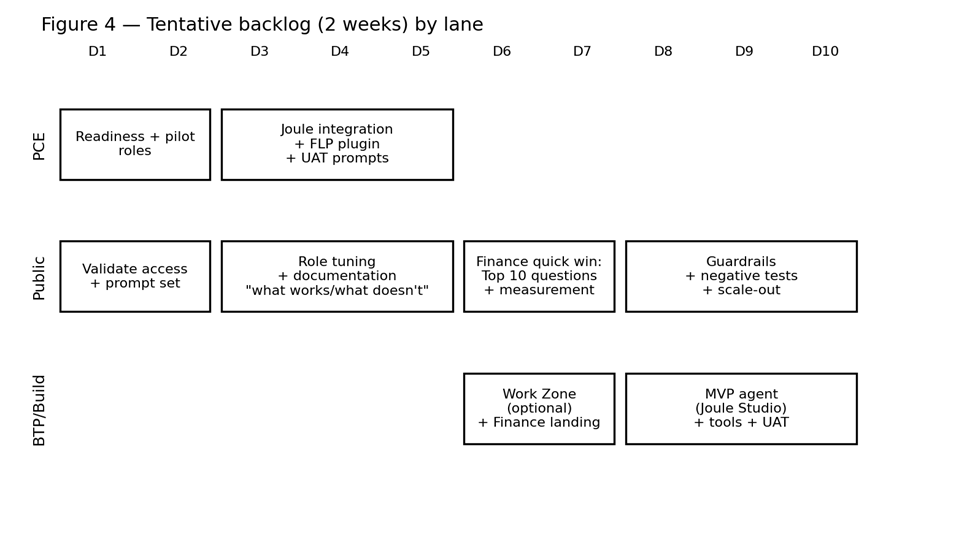
Figure 4 - Tentative backlog (2 weeks) by lane
Sources (to validate availability and APIs)
· Agent Builder in Joule Studio (GA) - SAP Community: https://community.sap.com/t5/artificial-intelligence-blogs-posts/agent-builder-in-joule-studio-is-now-generally-available-build-your-own/ba-p/14289282/
· Integration with S/4HANA Cloud Private Edition - SAP Help: https://help.sap.com/docs/joule/integrating-joule-with-sap/integration-with-sap-s-4hana-cloud-private-edition
· Joule integration in SAP Build Work Zone (Advanced) - SAP Help: https://help.sap.com/docs/build-work-zone-advanced-edition/sap-build-work-zone-advanced-edition/integration-with-joule
· SAP Business Accelerator Hub (API catalog): https://api.sap.com/
· Supplier Invoice OData (reference) - SAP Help: https://help.sap.com/docs/SAP_S4HANA_CLOUD/bb9f1469daf04bd894ab2167f8132a1a/7bc52558ef790a02e10000000a44147b.html
· Joule for Developers in PCE 2025 (ABAP AI) - SAP Community: https://community.sap.com/t5/technology-blog-posts-by-sap/sap-joule-for-developers-expands-to-private-cloud-accelerating-abap/ba-p/14237958


Comments